AI News
19 Dec 2025
Read 10 min
AI email management for law firms: Save time or risk?
AI email management for law firms can cut inbox time while keeping critical context and client trust.
AI email management for law firms promises faster inbox triage, but speed can hide risk. Use it to block promos and draft quick replies, yet verify anything that touches facts, deadlines, or strategy. This guide shows where AI saves minutes, where it burns hours, and how to measure real ROI with safeguards.
Lawyers drown in email. Some messages are junk. Some are simple. A few carry real risk. New inbox tools claim they can sort, summarize, and even act for you. Some of that is true. Some is noise. The goal is not hype. The goal is time saved without mistakes.
What works today with AI email management for law firms
Low-risk wins
- Filter and auto-label promos, newsletters, and vendor outreach.
- Group long threads and collapse duplicates to reduce scanning.
- Extract clear fields like dates, docket numbers, POs, and tracking IDs.
- Draft short courtesy replies (received, thanks, scheduling holds) for review.
- Create tasks and calendar holds from obvious cues, with human approval.
- Summarize long chains for orientation, but keep the source one click away.
The verification paradox: when summaries cost time
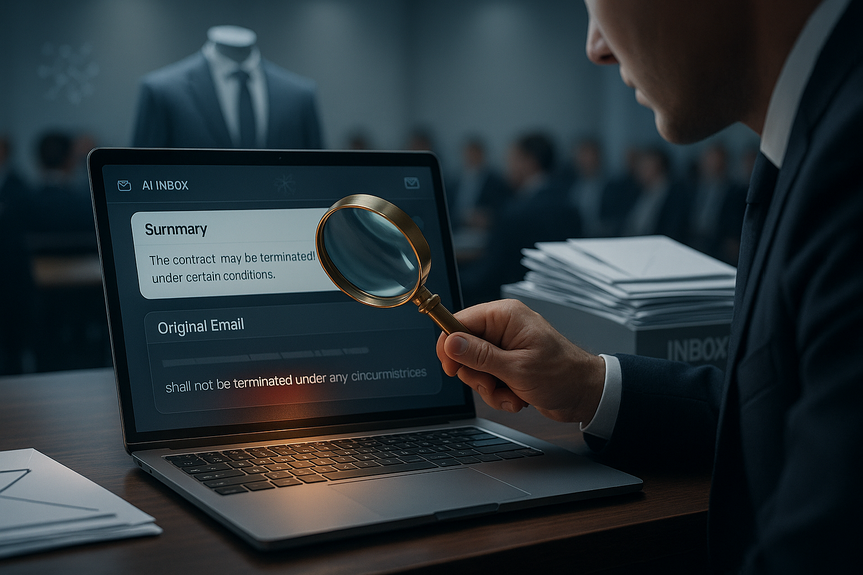
Summaries feel fast. But if you must still open the email to be sure, you now did two reads, not one. Over a day, that adds up. The test is simple: Does the summary replace a read for this class of messages at least half the time? If not, skip the summary view for that class. Watch for hidden traps:- “Reply-all” chains that hide a new ask in the middle.
- Opposing counsel who shift settlement tone with one careful line.
- Client nuance—what they value, how they speak, and what they avoid.
Risk hotspots lawyers cannot outsource to AI
- Deadlines and court orders: Never rely on AI alone for calendaring or docket flags.
- Privilege and waiver: Do not let AI route privileged threads without human eyes.
- Strategy and settlement: AI may miss subtle anchoring or a changed position.
- Conflicts: AI can surface names, but conflict calls stay with humans.
- Tone and relationship: A blunt client may sound angry but is just direct. Know the sender.
- Sensitive data: Client secrets, health info, or trade secrets need strict controls.
How to test ROI before you buy
Define success up front
- Minutes saved per lawyer per day (target a clear number, like 20–30 minutes).
- Triage accuracy: Precision and recall for “junk,” “FYI,” and “action needed.”
- False negatives: Rate of important emails misclassified as low priority.
- Read-replacement rate: Share of messages you handled without opening the email.
Run a short, fair pilot
- Two-week A/B test: Half the team uses the tool; half stays as-is.
- Baseline first: Measure current time spent on triage, replies, and calendaring.
- Hard rules: No auto-send; human approval for actions; logs enabled for audit.
- Daily check-in: Note misses, extra clicks, and any near-miss risks.
Do the math
- Break-even = (Seat cost + rollout time cost) / (hourly value of saved minutes).
- If it cannot beat break-even by a healthy margin, do not deploy firmwide.
Implementation playbook: weeks 1–4
Week 1: Configure and contain
- Turn off auto-send and auto-delete. Human in the loop only.
- Set strict labels: Marketing, Admin, FYI, Client Action, Court, Opposing Counsel.
- Block external training on client data; enable zero-retention where possible.
Week 2: Train on safe slices
- Feed it promos, newsletters, and shipping notices first.
- Build templates for brief replies: received, scheduling, confirming data points.
- Require links to source sentences in every summary.
Week 3: Pilot with a small group
- 5–10 lawyers from different practices; one paralegal and one assistant.
- Track misses and extra clicks; adjust labels and rules.
- Review 20 random AI actions per day for quality.
Week 4: Expand with guardrails
- Roll out to the next group if metrics hold.
- Publish a short “when to trust/when to read” rubric on the intranet.
- Keep weekly audits; retire features that fail the read-replacement test.
Ethical and client-duty guardrails
- Confidentiality: Demand SOC 2 or ISO 27001. Sign a DPA. Disable vendor training on your data.
- Jurisdiction: Choose data residency that matches client and court rules.
- Privilege: Do not route privileged mail through third-party models without explicit consent.
- Accuracy: No AI-generated facts or citations without verification.
- Billing: Avoid double-billing for AI summary and full read; be transparent on time saved.
- Retention: Keep to client schedules; ensure AI actions do not delete needed records.
Signals that show real value
- Inbox noise drops by 30%+ without missing key messages.
- You handle at least 25% of low-risk emails without opening them.
- Calendar holds from AI never miss a court date (because you still confirm them).
- Lawyers report less context switching and fewer reply-all mistakes.
Pitfalls to avoid
- Letting summaries replace reading in matters with live deadlines.
- Automating tone-sensitive replies to clients or opposing counsel.
- Expanding scopes before a pilot proves net time savings.
- Trusting “smart” features that the team cannot explain or audit.
FAQ
Q: What is AI email management for law firms and what can it realistically do today?
A: AI email management for law firms promises faster inbox triage and can filter promotions, group long threads, extract clear fields like dates and docket numbers, and draft short courtesy replies for review. It works best as a filter and note-taker that reduces noise while keeping the source one click away.
Q: Which email tasks are safe to let AI handle?
A: Use AI email management for law firms for low-risk wins like filtering and auto-labeling promotions, collapsing duplicate threads, extracting dates or tracking IDs, and drafting brief courtesy replies that require human approval. These tasks cut inbox noise and reduce the chance of missing simple items like shipping dates or meeting times.
Q: What is the verification paradox and how does it affect time savings?
A: When evaluating AI email management for law firms, the verification paradox is that summaries feel quicker but often require opening the original message, creating two reads and wiping out intended time savings. The guide recommends testing whether a summary replaces a full read at least half the time before relying on it.
Q: What email types should never be outsourced to AI?
A: AI email management for law firms should not be relied on alone for deadlines and court orders, privileged threads and waiver issues, strategy or settlement decisions, conflict checks, tone-sensitive relationship judgments, or handling sensitive client data. Use AI to surface patterns and nudge you, but keep humans in charge for these risk hotspots.
Q: How should a firm pilot an AI email tool to measure ROI?
A: To pilot AI email management for law firms, run a short two-week A/B test with baseline measurements of triage time, hard rules (no auto-send), human approval, and action logs for audit. Define success metrics up front—minutes saved per lawyer per day, triage precision and recall, false negatives, and read-replacement rate—and calculate break-even by comparing seat and rollout costs to the hourly value of saved minutes.
Q: What are the recommended configuration and training steps in the first month?
A: Start week 1 by configuring and containing the tool: disable auto-send/auto-delete, set strict labels (Marketing, Admin, FYI, Client Action, Court, Opposing Counsel), and block external training on client data. Week 2 feed safe slices like promos and shipping notices and build brief-reply templates, week 3 pilot with 5–10 lawyers while tracking misses, and week 4 expand only with guardrails and a published “when to trust/when to read” rubric.
Q: What ethical and client-duty guardrails are essential when using AI email tools?
A: When deploying AI email management for law firms, require strict confidentiality controls (SOC 2 or ISO 27001), a signed DPA, disabled vendor training on your data, and appropriate data residency for jurisdictional rules. Also insist that privileged mail not be routed through third-party models without explicit consent, verify any AI-generated facts or citations, avoid double-billing for summaries and full reads, and enforce retention policies so AI actions cannot delete required records.
Q: What signals indicate AI email management for law firms is delivering real value?
A: Key signals include a drop in inbox noise (the guide cites 30%+), handling at least 25% of low-risk emails without opening them, and calendar holds from AI that never miss court dates because humans confirm them. Additionally, look for reports of reduced context switching and fewer reply-all mistakes among lawyers.
Contents