 AI-generated
 AI News
12 Oct 2026
Read 9 min
Text-to-video trailer guide: How to make cinematic teasers
text-to-video trailer guide helps fan creators craft cinematic two-minute teasers with editing tips
This text-to-video trailer guide shows how any fan creator can turn a late-night idea into a sharp, cinematic teaser. Learn why trailers suit AI video, how to plan four key beats, write director-style prompts, keep characters consistent, and cut music and sound for maximum hype—all with clear steps you can follow today.
You do not need a studio or a giant VFX team to sell a big idea. AI text-to-video tools can produce striking shots in minutes. The trick is to think like a trailer editor, not a feature director. Short, bold moments work best. Plan your beats, direct each shot with care, and let sound drive emotion.
Why trailers fit AI video right now
AI still struggles with long scenes, perfect faces, and clean dialogue. Trailers avoid those pain points. Teasers live on quick shots, strong mood, and mystery. Two- to three-second clips hide small glitches and turn them into style. Wide cityscapes, slow reveals, and quick action bursts all shine with AI.Your text-to-video trailer guide: Four beats that sell
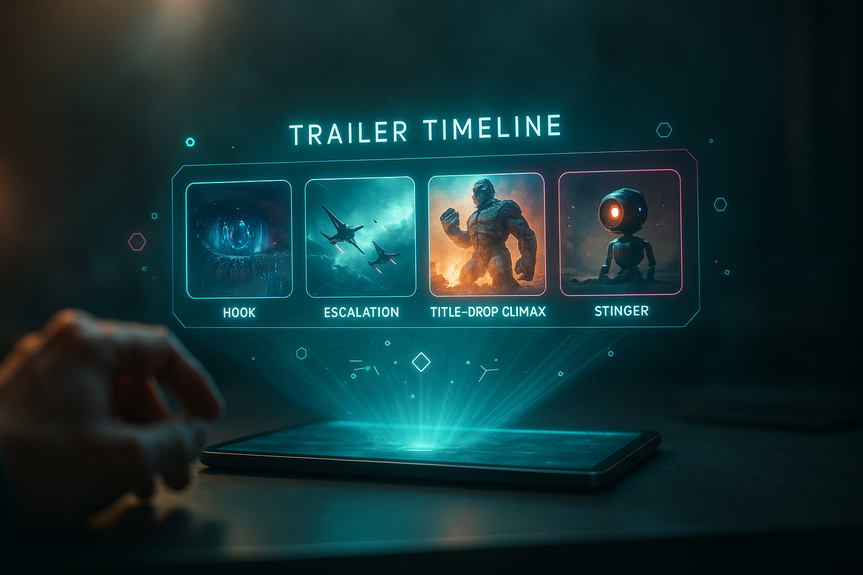
1. The Hook (0:00–0:30)
Set the world first. Use slow, steady shots. Think desert ruins, neon towers in rain, or a silent station orbiting a stormy planet. Let color, weather, and scale do the talking before any character shows up.2. The Escalation (0:30–1:15)
Tighten the rhythm. Add a pulse in the music. Cut to medium shots with motion: doors sliding open, boots splashing, sparks falling. Show hands, gear, and eyes. Raise questions. Tease danger.3. The Title-Drop Climax (1:15–1:45)
Go big, then cut to silence. Follow with a huge hit and your most epic visual: a colossus breaking cloud cover, a starfighter dive, a blast of magic. Smash to black and reveal your title.4. The Stinger (1:45–2:00)
End with one last tease. A relic in rubble. A shadow in smoke. One chilling line of VO. Leave viewers wanting the full movie.Prompt like a cinematographer, not a novelist
One clear action per shot
Describe a single motion so the model can render cleanly.- Low-angle medium shot; cyber samurai draws a glowing katana; slow push-in.
Direct the lens and light
Real film terms shape the image.- Anamorphic flare, shallow depth of field, Dutch angle, rim light, volumetric fog, 35mm grain.
Design micro-moments
Plan clips that land in two seconds.- Visor snaps on. Reactor sparks rain. Drone passes over a shattered bridge.
Keep characters and audio coherent
Character consistency without headaches
Faces can drift between shots. Hide the risk and build style.- Use a helmet, visor, mask, or deep shadow.
- Repeat a strong silhouette and color scheme.
- Favor over-the-shoulder and profile angles.
Voice and sound over lips
AI lipsync can be uncanny. Trailers rarely need it.- Record a short voiceover line on a desk mic.
- Add light reverb and a low noise bed.
- Let SFX sell scale: airlock hiss, plasma hum, rain, bass drops.
Edit for impact: music, pacing, and sound
Build the spine
- Pick one music track with a clear rise and stop.
- Cut your eight to twelve best clips to the beat.
- Use hard cuts and brief whooshes to glue scenes.
Shape the crescendo
- Mute music for one beat before the title hit.
- Layer sub-bass or a brass boom on your logo.
- Fade to a soft ambient pad for the stinger.
Quick starter workflow
- Outline the four beats in one page.
- Write 12 director-style prompts (one action each).
- Generate shots with a browser tool; iterate fast.
- For a steady hero look, make one strong image and run image-to-video for motion.
- Cut in Resolve or Premiere; sync to a track with a clean rise and drop.
- Add SFX layers last: weather, gear, engines, impacts.
Common pitfalls and quick fixes
- Too many actions in one prompt → Split into two prompts.
- Flat lighting → Add rim light, fog, and reflections on wet ground.
- Messy framing → Lock distance (wide/medium/close) and angle (low/high).
- Random costumes across shots → Repeat colors, emblems, and props.
- Shots feel slow → Trim to two seconds; cut on beat accents.
For more news: Click Here
FAQ
Q: Why are trailers a better fit for AI text-to-video tools than full-length scenes?
A: AI struggles with long, continuous scenes, stable facial features, and clean dialogue, making feature-length work unreliable. This text-to-video trailer guide explains that trailers thrive on short, impressionistic two- to three-second clips that hide glitches and emphasize mood and spectacle.
Q: What are the four key beats I should plan for a cinematic teaser?
A: A classic two-minute teaser uses four beats: The Hook (0:00–0:30) to establish mood and scale, The Escalation (0:30–1:15) to tighten rhythm and show medium-motion beats, The Title-Drop Climax (1:15–1:45) for the big spectacle and smash-to-black, and The Stinger (1:45–2:00) for one final tease. The text-to-video trailer guide frames each beat to build mood, momentum, crescendo, and a lingering payoff.
Q: How should I write prompts to get cinematic-looking AI clips?
A: Prompt like a director rather than a novelist: call out one clear action per shot and specify camera distance, lens and lighting terms such as anamorphic flare, shallow depth of field, and a slow push-in. The text-to-video trailer guide recommends using technical film vocabulary and micro-moments so each two- or three-second render reads like a cinematic frame.
Q: How long should each generated clip be for a trailer timeline?
A: Keep clips short—typically two to three seconds—so pacing stays brisk and small artifacts are masked by montage. This text-to-video trailer guide advises designing prompts around these brief beats and assembling eight to twelve striking micro-clips for the timeline.
Q: How can I keep a protagonist consistent across multiple AI-generated shots?
A: Because faces can drift between renders, use visual identifiers like helmets, visors, masks, strong silhouettes, repeating colors, and distinctive props to imply the same character. Favor over-the-shoulder, profile shots, and silhouette lighting to suggest continuity without relying on perfect facial consistency.
Q: What’s the best way to handle dialogue and audio since AI lipsync is unreliable?
A: Avoid on-camera dialogue and instead record a short voiceover on a desk mic, add light reverb and a low noise bed, and let the VO anchor emotion while visuals do the worldbuilding. Layer tactile sound effects—airlock hisses, plasma hums, rain, and heavy bass drops—to sell scale without risky lipsync.
Q: How do I assemble the final cut and use music for maximum impact?
A: Cut your best eight to twelve clips in an editor such as Resolve or Premiere, sync them to a single music track with a clear rise and stop, and use hard cuts and whooshes to glue scenes. The text-to-video trailer guide recommends muting music for a beat before the title hit, layering sub-bass or a brass boom on the logo, and fading to an ambient pad for the stinger.
Q: What common pitfalls should I watch for when making AI-generated trailer shots and how do I fix them?
A: Common issues include packing too many actions into one prompt, flat lighting, messy framing, inconsistent costumes, and shots that feel slow; fix them by splitting prompts, adding rim light or fog and reflections, locking shot distance and angle, repeating colors or emblems, and trimming clips to two seconds to cut on beat accents. Keeping this checklist from the text-to-video trailer guide helps you iterate faster and produce cohesive teaser reels.
Keep reading, keep building
Three things from our own workshop that fit this topic:
- Diktly Free is our dictation app for Mac: speech becomes text entirely on your own machine, nothing goes to the cloud. Free version, Basic 14.99 €.
- 1000+ Prompts to Level Up Your Life is our most downloaded pack. Pay what you want, including 0.
- OpenAI Agent Mode for Beginners walks you through letting AI agents handle tasks for you. 19.99 $.
Our own products. Tech Moments is our newsletter on AI and tech in plain language, one email, no noise. Subscribe below.
Contents